Property Managers & Commercial

Commercial Handyman Software
Every Rental, Every Work Order, One Monthly Statement

Property managers, landlords and small offices are the steadiest customers a handyman can have, if you can keep up with them. HandymanBossPro keeps every address under one client, puts lockbox codes and unit notes on the job, saves before and after photos for owners, records PO numbers, and sends one monthly statement with every line labeled by address.

Start Your 14-Day Free TrialTry the Live Demo
No credit card required  ·  14-day free trial  ·  from $59/mo after
1 Client
Many Addresses
1 Bill
Per Month, by Address
$59
Plans Start Per Month
14 Days
Free Trial, No Card
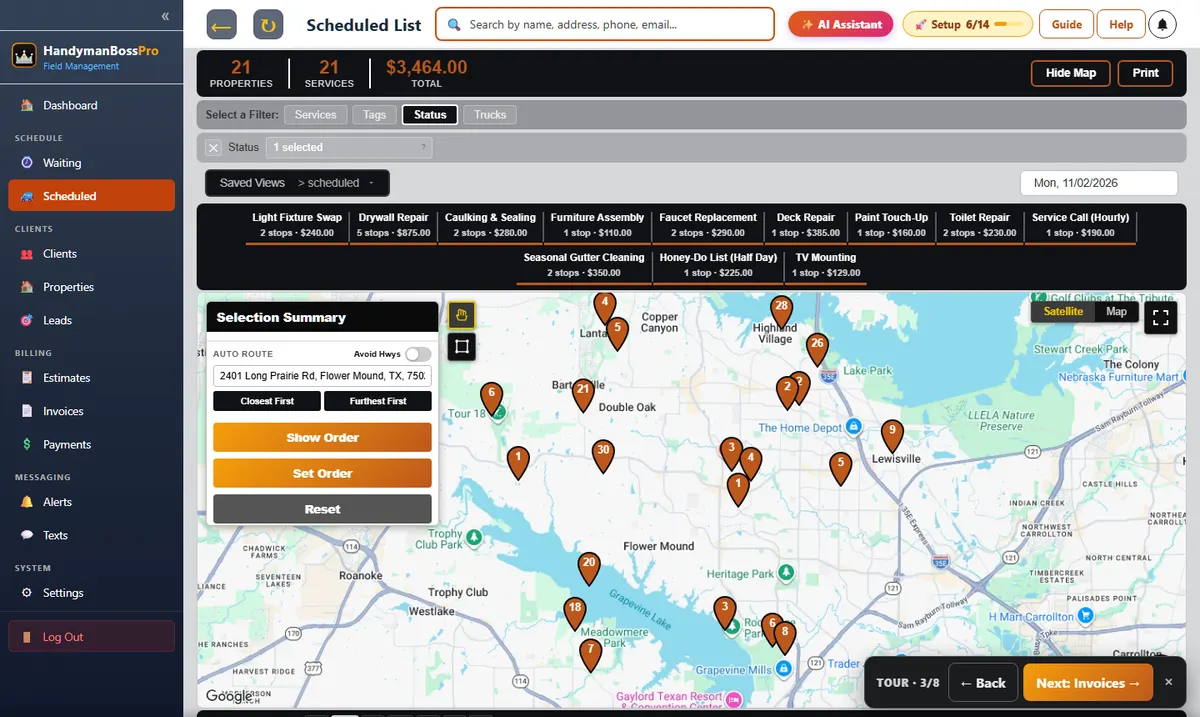
HandymanBossPro property manager account with many rental addresses on a map and a monthly statement

Managers Hire the Handyman
Who Makes Their Job Easier.

A manager with 40 doors wants fast turnarounds, photos for the owner and one bill. Give them that and they stop shopping around.

🏢

Many Addresses

Every rental under one client, each with its own history.

🔑

Lockbox Codes

Unit access notes right on the job.

📷

Photos for Owners

Before and after on every work order.

🧾

PO Numbers

Recorded on the job for the manager's books.

📅

Monthly Statement

One bill, each line labeled with the address.

📥

CSV Import

Bring in a whole portfolio at once.

One Manager, Forty Doors, One Record

Each rental is an address under the manager's client record, with its own items, notes, codes and job history.

  • Each address on the map
  • Unit-specific access notes
  • Job history by address
  • Make-ready lists on the job
  • Monthly or weekly billing
Example Account
Prairie Gate Property Management
9 rental homes · monthly billing
Rental Home #3
Toilet running · lockbox 0731
Open
Rental Home #7
Make-ready · move-in Friday
Thu
Rental Home #1
Door adjustment · done
Done
Illustration of what you see from your own records.

How a Work Order Runs

From the manager's request to the monthly statement.

01

Request Comes In

By text, email or the customer app.

02

On the Board

Scheduled to a van with the unit's access notes.

03

Done With Photos

Checklist, hours, materials and before/after photos.

04

Month-End Statement

Every visit on one bill, by address.

Managers Leave Handymen Who Are Hard to Work With

Slow responses, missing photos and messy bills cost accounts.

A manager has owners asking what was done and tenants asking when. If you can't answer quickly, they find someone who can.

Ten separate invoices a month for ten rentals is a mess for their bookkeeping.

Software that keeps every unit, photo and visit organized is what turns one work order into a standing account.

Commercial Handyman Features

Built for landlords, property managers, HOAs and small offices.

🏢

Client With Many Addresses

One record, every property.

🗺️

Map of the Portfolio

Every unit as a pin.

🔑

Access Notes

Lockbox and gate codes by unit.

📝

Work Order Lists

The task list on each job.

📷

Photos

Before and after for owners.

🧾

PO Numbers

On the job.

📅

Period Billing

Monthly or weekly statements.

💲

Tax by Property

Each property's own rate.

🏷️

Tags & Custom Fields

Owner names, unit types, anything.

📥

CSV Import

Whole portfolios at once.

🔁

Recurring Walk-Throughs

Monthly visits that come due.

💬

Texting Managers

Two-way texting from the office.

The Statement Managers Ask For

Every completed visit for a monthly client waits for month end, then goes on one statement with each line labeled with the address.

  • One statement per month
  • Each line by address
  • Sales tax by property
  • Photos on every job
Example Statement
Cedar Point Apartments
6 buildings · monthly
Building A
Drywall repair · Nov 3
$175
Building D
Lock install · Nov 12
$110
Total
One payment
$285
Illustration of what you see from your own records.

Simple Plans. Never Billed Per User.

Pick the plan that fits your business. Every plan starts with a 14-day free trial and no credit card.

Compare plans on the pricing page.

Commercial Handyman: Common Questions

Can one client have many addresses?

Yes. A property manager is one client with every rental as its own address, each with its own notes and history.

Can I bill monthly?

Yes. Set the client to monthly or weekly billing and their visits go on one period statement, each line labeled with the address.

Can I import a manager's properties?

Yes. Import a CSV of addresses under the client. They're placed on the map automatically.

Can I record PO numbers?

Yes. Record the manager's PO number on the job.

Commercial accounts are one part of HandymanBossPro. See all features or go back to the handyman software overview.

Commercial Handyman Guides

Property managers, make-readies, tenant work orders, HOAs, offices, short-term rentals, statements and winning accounts.

  1. Commercial Handyman Software: The Complete Guide for Property Manager and Commercial Accounts
  2. Setting Up a Property Manager Account in Handyman Software
  3. One Client With Many Addresses: Why It Matters for Handymen
  4. Running Rental Make-Readies for Property Managers
  5. Handling Tenant Work Orders for Landlords and Managers
  6. The Monthly Statement for Small Landlords
  7. Handyman Work for HOAs and Common Areas
  8. Handyman Services for Small Office Buildings
  9. Handyman Work for Churches and Nonprofits
  10. Handyman Services for Small Retail Stores
  11. Handyman Work for Restaurants
  12. Short-Term Rental Repairs Between Guests
  13. Handyman Work for Small Apartment Complexes
  14. Vacant Unit Access: Lockboxes, Codes and Security
  15. Before and After Photos for Rental Owners
  16. Not-to-Exceed Limits and Manager Approvals
  17. Importing a Property Manager's Portfolio Into Handyman Software
  18. Monthly Walk-Throughs for Commercial Handyman Clients
  19. After-Hours Commercial Handyman Work
  20. Keeping Commercial Handyman Accounts Year After Year
  21. Pricing Commercial Handyman Work
  22. Insurance Certificates and Vendor Paperwork for Commercial Clients
  23. Tags, Custom Fields and Reports for Commercial Accounts
  24. Texting Property Managers From the Office
  25. Getting Estimates Approved by Property Managers
  26. PO Numbers for Commercial Handyman Clients
  27. Statements by Address: What Property Managers Want to See
  28. Winning Your First Property Manager Account
  29. Choosing Commercial Handyman Software

Make Every Manager
a Standing Account.

Many addresses per client, access notes, photos for owners and one monthly statement. Try HandymanBossPro free for 14 days.

Start Your 14-Day Free TrialTry the Live Demo
No credit card required  ·  14-day free trial  ·  from $59/mo after